Publishing
Note
This section only applies to installations such as the django-cms-quickstart project which use the djangocms-versioning package for versioning. django CMS’ modular architecture allows for other versioning packages, too.
In Django CMS, publishing and versioning are crucial aspects for editors managing content. Here’s a breakdown of how they work:
Publishing
Publishing refers to making content available to website visitors. In Django CMS, you typically create or edit content using a draft, which means the unfinished content or changes are not immediately visible to the public. Editors can work on content privately until it’s ready for publication.
This is the typical workflow:
Create Draft: Editors create or modify content only in a draft version within the CMS admin interface.
Preview: They can preview how the content will appear on the live site before publishing.
Publish: When ready, editors can publish the changes to make them visible on the live website for visitors to see.
Published content cannot be changed any more. To make additional changes, create a start over the process and create a new draft based on the published version.
Managing versions
Versions in Django CMS keep track of changes made to content over time. This feature allows editors to revert to earlier versions of content if needed and view the history of modifications:
Version History: Django CMS maintains a history of all changes made to a particular piece of content.
Compare Versions: Editors can compare different versions of content to see what changes were made between each iteration.
Rollback: If necessary, editors can revert to a previous version of the content, effectively undoing recent changes.
These functionalities empower editors to manage content effectively, ensuring quality and control over what gets published on the live site while maintaining a history of changes for reference or restoration purposes.
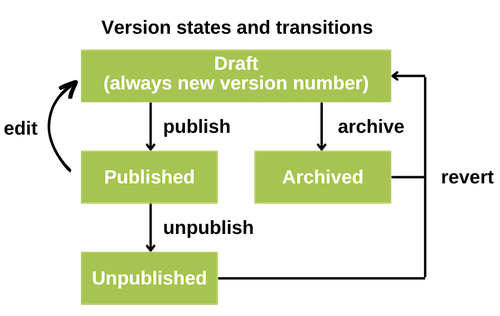
This diagram summarizes the possible states and the actions which create a change in the state of a version.
Locked versions
Note
This feature is not enabled in all installations of django CMS. See django CMS Versioning documentation for more information.
Version locking in Django CMS is a feature that automatically locks each draft version of a content item to prevent unintended modifications or edits. A locked draft can only be changed by the person who created the draft. This functionality is particularly useful when you want to ensure that not two editors make changes to a specific content, ensuring changes do not interfere with each other.